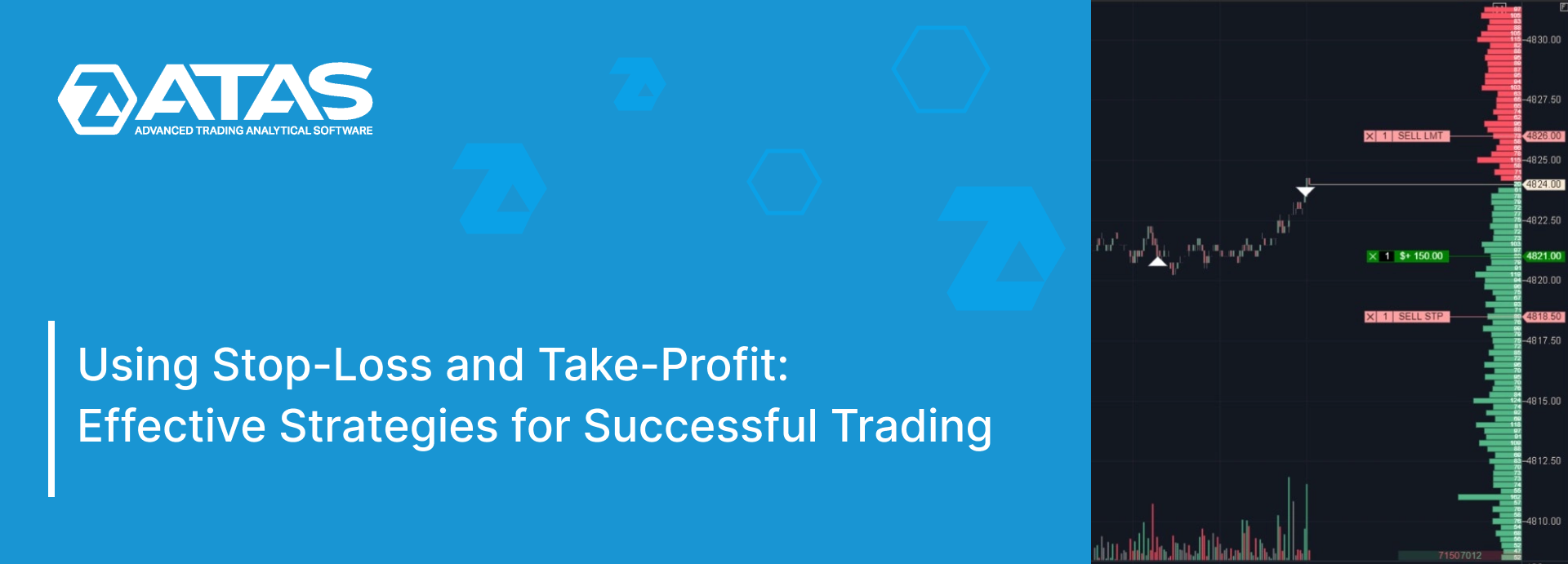
In this article, we will explain in simple terms what stop-loss and take-profit are and how to use them in ATAS.
Read more:
Stop-loss (SL) and take-profit (TP) are types of trading orders. Traders use these orders to minimize losses and secure profits. They are often referred to as “stop” and “take.”
In the simplest terms:
- Stop-loss closes losing trades;
- Take-profit closes profitable trades.
Both stop and take orders allow traders to set predetermined prices at which the system will automatically execute the orders on the exchange. Therefore, both stop-loss and take-profit are pending orders.
Depending on the situation, these can be either market orders or limit orders. To understand the difference between market and limit orders, check out the article about how orders are matched on the exchange.
ARE STOP-LOSSES AND TAKE-PROFITS NECESSARY?
There is no consensus among traders about the use of stop-losses and take-profits.
Proprietary traders always use short stops in their trading. Setting stop-losses is typically a requirement for working with proprietary trading firms, although increased competition among these firms may lead some to allow traders to use less strict risk control measures. It is common practice for the size of a stop to be less than half of the average daily earnings.
Some traders use mental stops, allowing losses to grow. Paradoxically, this can include both professionals, who close a position once they are convinced they are wrong, and beginners, who struggle to admit mistakes and hope the price will soon turn in their favor.
Famous traders like Alexander Elder and Larry Williams strongly recommend using stops.
Meanwhile, long-term investors, like those in stock indexes, might not use stop-losses because their strategy focuses on long-term asset growth. They often see temporary declines as opportunities to invest more, rather than as risks of losses.
Every trading strategy should have not only entry rules but also exit ones. Therefore, besides stops, traders use take-profits or a trailing stop, which will be discussed later.
WHAT IS STOP-LOSS?
- A sell-stop is used when a trader has an open long position. In this case, the stop will be set below the entry price.
- A buy-stop is used when a trader has an open short position. In this case, the stop will be set above the entry price.
There is also a trailing stop. This stop moves either manually or automatically with the price. Initially, it moves to the breakeven point and then starts to protect the growing profit. You can adjust the size and step of the trailing stop. It is important to remember that prices usually fluctuate up and down, so stops should not be placed too close to the entry point.
WHAT IS TAKE-PROFIT?
- Traders use a sell-take-profit when they have a long position. In this case, the take-profit is set above the entry point.
- Traders use a buy-take-profit when they have a short position. In this case, the take-profit is set below the entry point.
In a typical trading scenario, the take-profit order is usually placed at least three times farther from the price than the stop order.
Some believe that take-profits work best in scalping, during sharp price movements, or when trading within a range. However, during a trending market, a pre-set take-profit can limit potential profits.
HOW TO USE STOP-LOSS AND TAKE-PROFIT?
Stop-loss and take-profit orders are not executed immediately but are triggered when certain conditions are met in the future.
Let’s see how stop-loss and take-profit work on the ATAS trading and analytics platform.
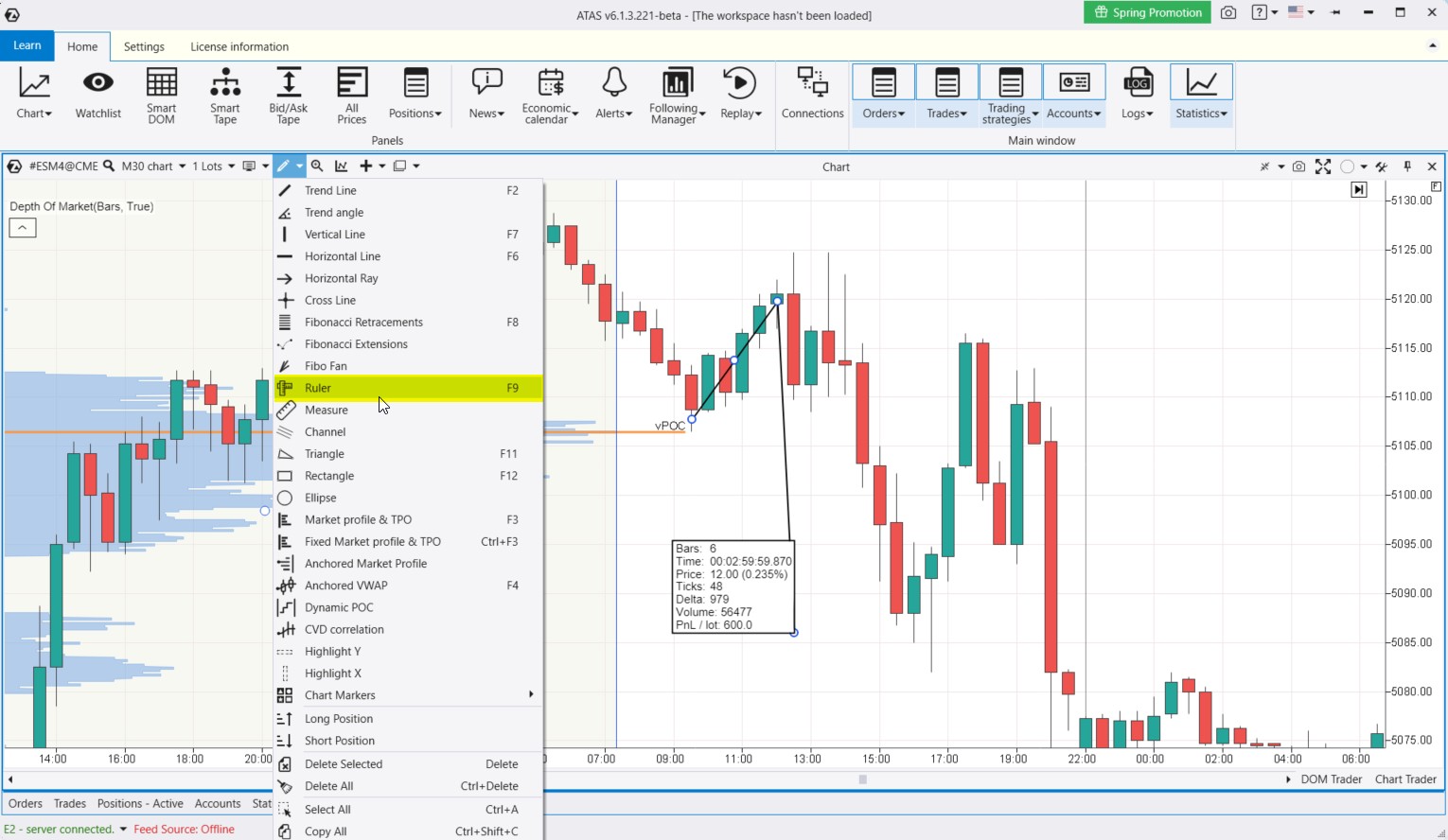
Example 1. On the E-mini S&P 500 futures chart, 30-minute timeframe.
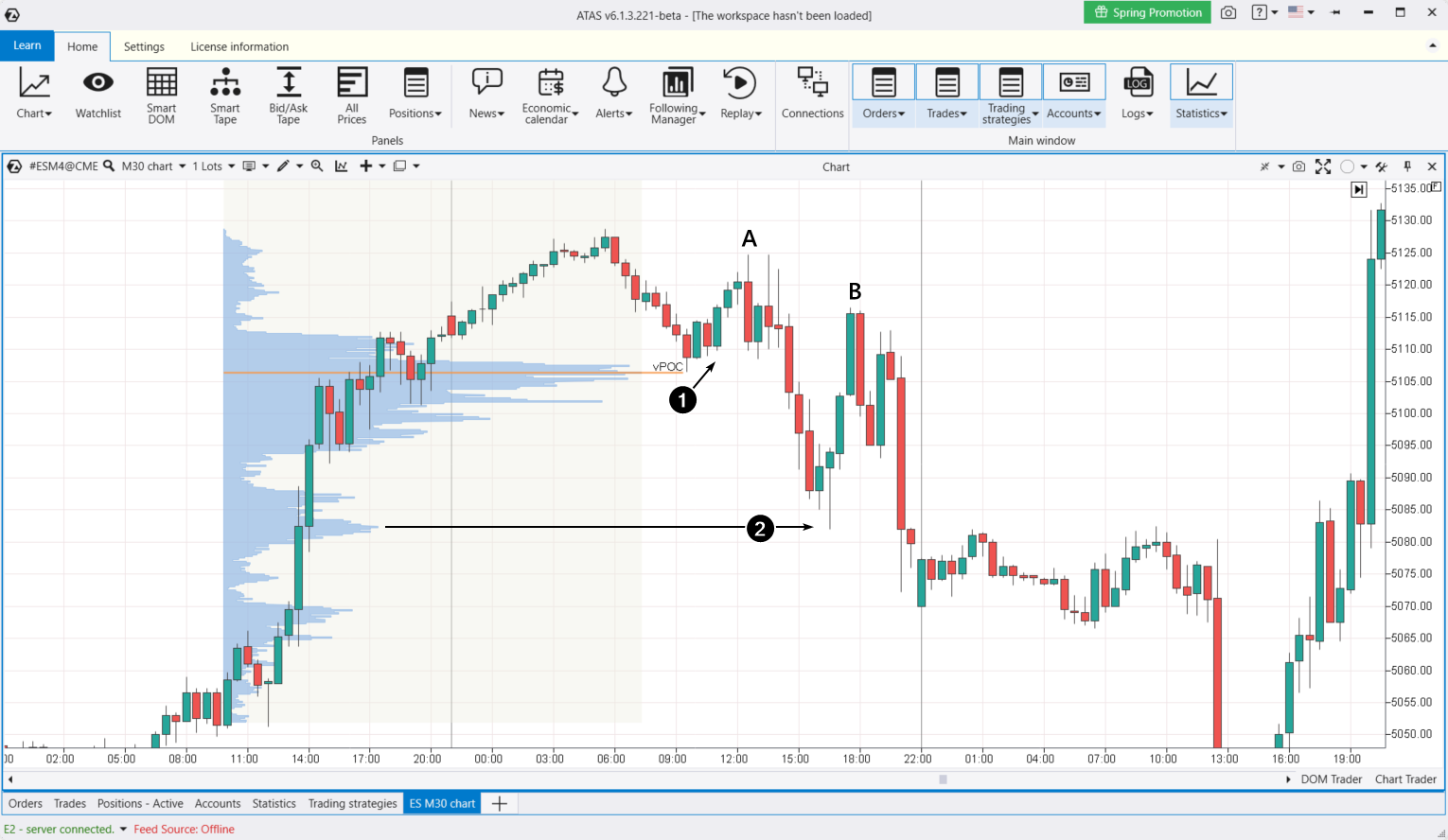
Suppose a trader analyzed the market profile (shown in blue) and made a plan to buy if the price dropped to key support levels.
The first of these levels is the vPOC. When this level was tested (1), the trader could have entered a long position (using confirming signals on a minute chart, for example), set a stop-loss just below the vPOC level, and placed a take-profit slightly above it. To ensure a good risk/reward ratio, the take-profit should be set a bit farther away.
On the way to the peak at point A, depending on the trader’s decisions, the following could have happened:
- the take-profit could have been triggered automatically;
- the trader could have moved the stop-loss to the breakeven point;
- another scenario.
In any case, betting on a bounce from the vPOC level turned out to be a good opportunity for profit.
The second support level was the bulge (2) on the profile around 5082. Here, the trader could:
- confirm the entry on a lower timeframe;
- set a stop-loss below the high-volume level;
- move the stop-loss to breakeven;
- lock in profit manually or with a take-profit set along the price path to the peak at point B.
What are the risks and rewards for the trader?
Let’s assume the trader uses the services of the AMP Futures broker. According to the contract specifications on their website:
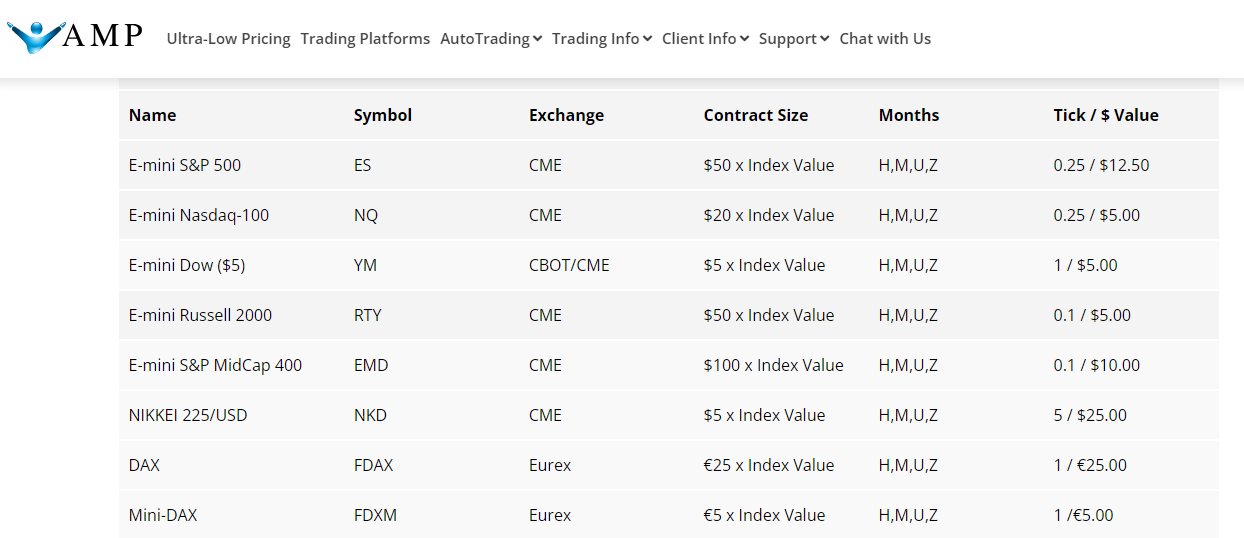
1 tick = $12.50 when trading one contract.
Therefore, 10 ticks in the desired direction (an upward bounce) would yield a profit of $125 (excluding commissions). Conversely, a stop-loss set 4 ticks below the entry point would result in a loss of $50.
These calculations can be easily performed using the Ruler tool built into ATAS.
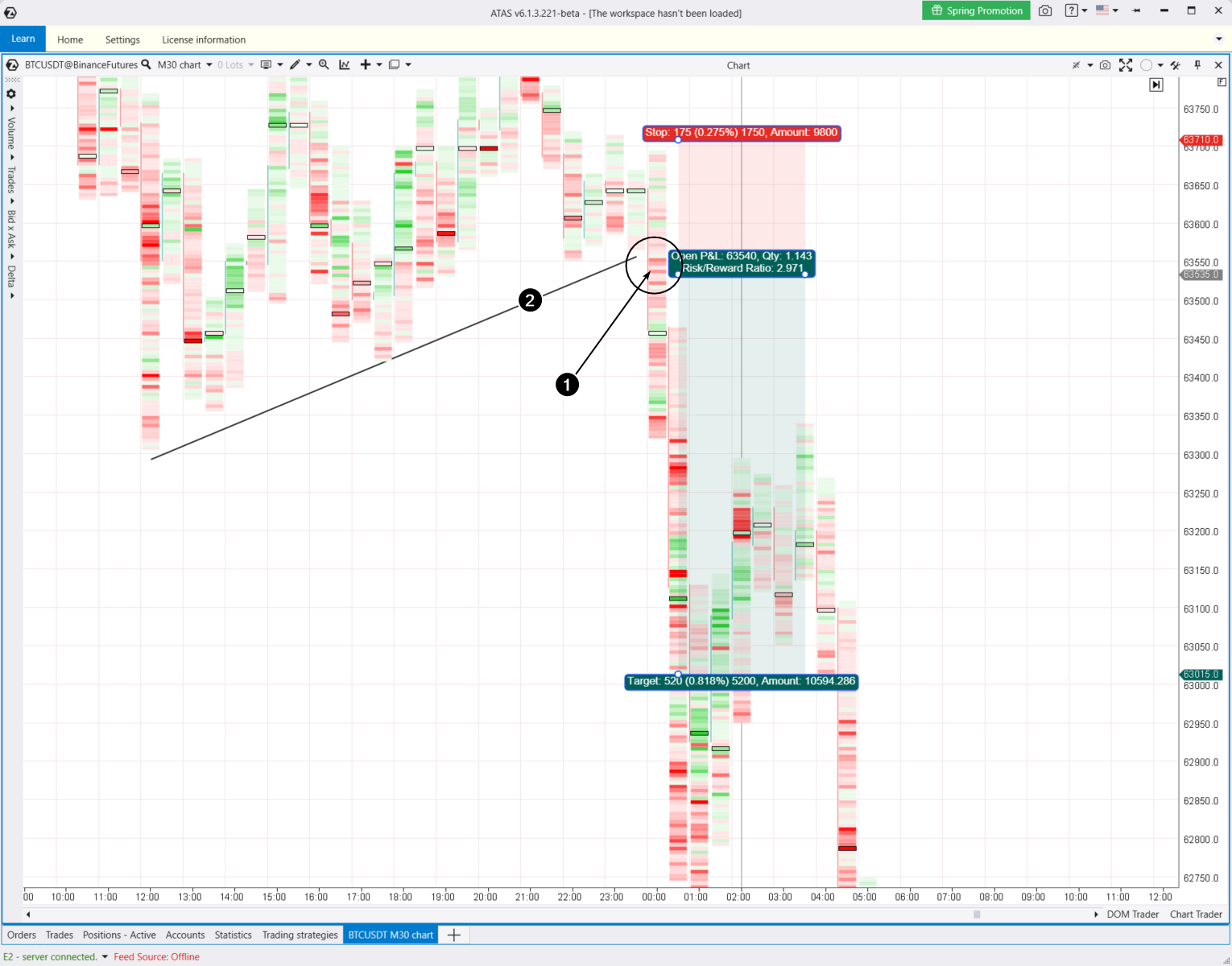
Example 2. Binance cryptocurrency exchange, Bitcoin futures, 30-minute cluster chart.
Let’s say the trader spotted seller activity (bright red clusters marked as 1) when the price broke through a trendline (marked as 2), which is the lower boundary of a consolidation zone. The trader decided to go short, anticipating a significant downward movement.
The trader then:
- entered the short position at 63,535;
- set a stop-loss just above the previous local high at 63,710;
- set a take-profit at 63,015, slightly above the psychological round level.
This setup gave a risk-to-reward ratio of about 1:3, which is a classic proportion.
Planning such a trade, including position sizing, can be easily done using the Short drawing tool in the ATAS platform (as shown in the screenshot above). For planning buys, you can use the Long drawing tool.
LINKED ORDERS
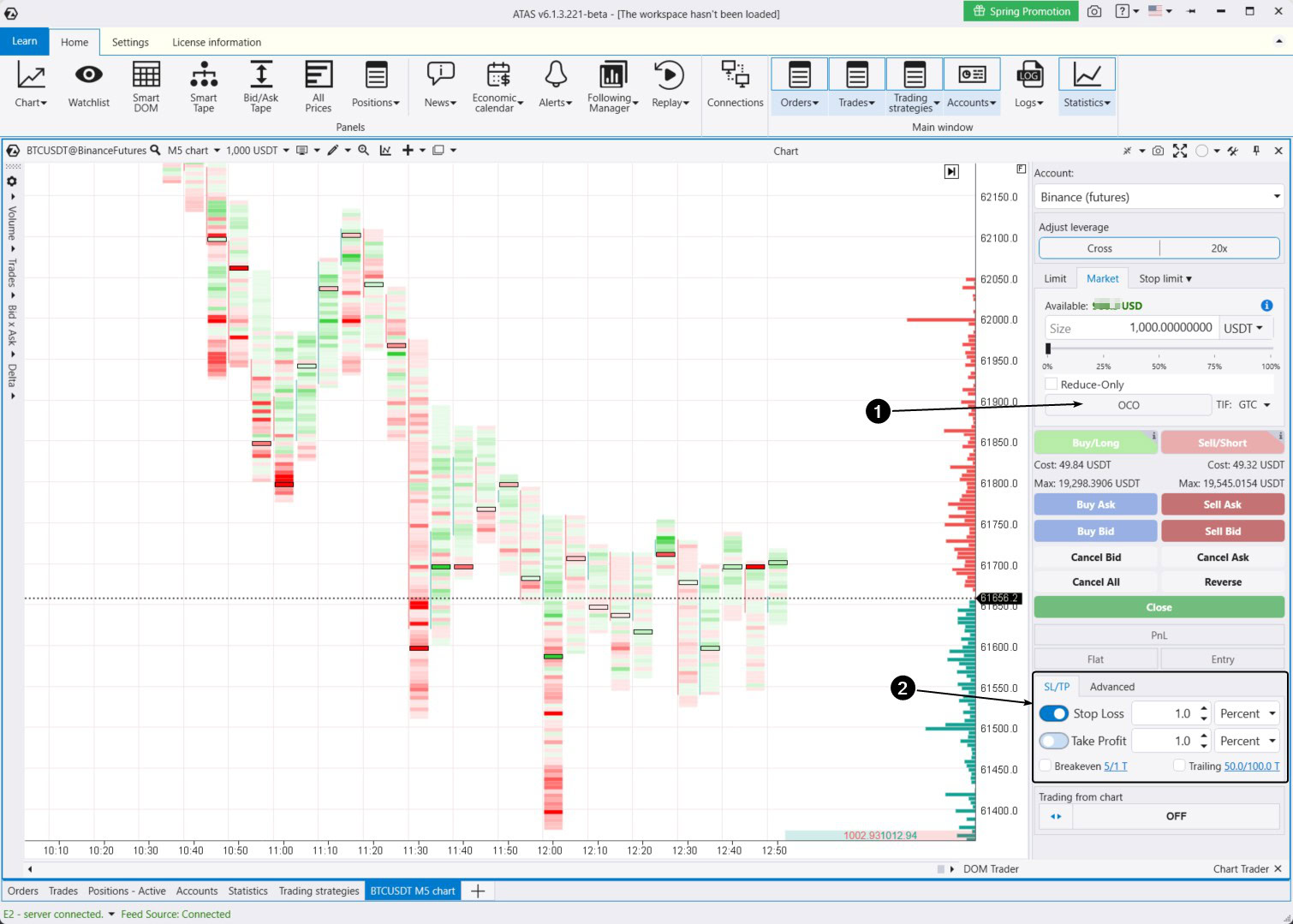
In ATAS, you can place not only individual orders but also linked OCO orders. OCO stands for “One-Cancels-the-Other Order.”
As soon as one OCO order is executed, the other is automatically canceled. A trader can place linked stop and take orders without worrying that one of them will remain active in the system.
To do this, use the functionality available on the Chart Trader panel (indicated by the arrow in the screenshot below).
But there is a catch with OCO orders. If the trader manually closes a position, the stop and take orders will stay active in the system. They will be automatically executed if the price hits the specified level. Therefore, traders need to be mindful to avoid being surprised later: “Where did this position in my portfolio come from?”
Exit Strategies in ATAS
The ATAS platform offers powerful exit strategies, which enable you to automatically set stop-loss and take-profit orders.
By automating stops and takes, a trader can:
- spend more time focusing on trading,
- experience less stress,
- minimize the risks of incorrect stop and take settings,
- improve discipline, predictability, and enhance analysis and error identification in trading.
The exit strategies panel is indicated by arrow (2) in the screenshot above. For more details on how to use it and the available strategies, check out the article: How to Use Exit Strategies in ATAS.
How to Calculate the Size of Stop-Loss and Take-Profit
There are several approaches to calculating stop-loss and take-profit orders:
- Percentage stop-loss: This is the simplest method, where the stop-loss is set at a certain percentage of the purchase price of the asset. For example, if a trader buys a stock at $100 and sets a stop-loss at 3%, the stop will be triggered at $97. It is generally recommended that the risk per trade should range from 1% (conservative approach) to 5% (aggressive approach) of the trader’s capital.
- Volatility stop-loss: This method uses an indicator (for example, the Average True Range (ATR)) to determine stops based on current market volatility. For instance, if the ATR is $2, a trader might set a stop-loss 1.5 ATR below the purchase price. This helps adapt the stop-loss to changing market conditions.
- Technical stop-losses: These stops are set based on technical indicators or support and resistance levels. For example, if a trader identifies support at $90, the stop-loss could be set slightly below this level.
- Candle pattern stop-loss: This method involves analyzing chart patterns like “pin bars” or “engulfing patterns” and setting stop-losses based on these formations. For example, if a pin bar appears, you might place your stop-loss beyond the tail of the pin bar.
- Time-based stop-loss: Sometimes, traders set stop-losses based on time, such as closing the position at the end of the trading day regardless of its outcome. This helps avoid the risks of holding a position overnight.
There are also different approaches for setting take-profits.
There is not a one-size-fits-all strategy for SL and TP because each trader’s approach is unique.
To practice setting stop-losses and take-profits, we recommend:
- using the Market Replay feature (trader simulator).
- studying cluster charts, which offer more detailed data for analysis.
- use the DOM Levels indicator as a source of ideas for setting stop-losses.
More information on cluster analysis:
Conclusions
Stop-losses and take-profits are allies, not enemies, for traders. They protect the capital and aim to help it grow. By setting stop-losses and take-profits, one can gradually increase their position size.
It is crucial for traders to have the right mindset about stop orders and know how to use them effectively. Triggered stops do not mean that a trader is a failure or that their strategy is flawed. Trading involves working with probabilities. Making a fair number of mistakes is part of the process.
We hope this article has helped you see why setting stop-losses is so important.
Download ATAS. It is free. Once you install the platform, you will automatically get the free START plan, which includes cryptocurrency trading and basic features. You can use this plan for as long as you like before deciding to upgrade to a more advanced plan for additional ATAS tools. You can also activate the Free Trial at any time, giving you 14 days of full access to all the platform’s features. This trial allows you to explore the benefits of higher-tier plans and make a well-informed decision about purchasing.
The ATAS platform will provide you with powerful tools for trading with stop-losses and take-profits in futures, stocks, and cryptocurrency markets. ATAS also offers many other benefits for traders who use professional cluster charts along with useful indicators and additional features.
Do not miss the next article on our blog. Subscribe to our YouTube channel, follow us on Facebook, Instagram, Telegram or X, where we publish the latest ATAS news. Share life hacks and seek advice from other traders in the Telegram group @ATAS_Discussions.
Information in this article cannot be perceived as a call for investing or buying/selling of any asset on the exchange. All situations, discussed in the article, are provided with the purpose of getting acquainted with the functionality and advantages of the ATAS platform.