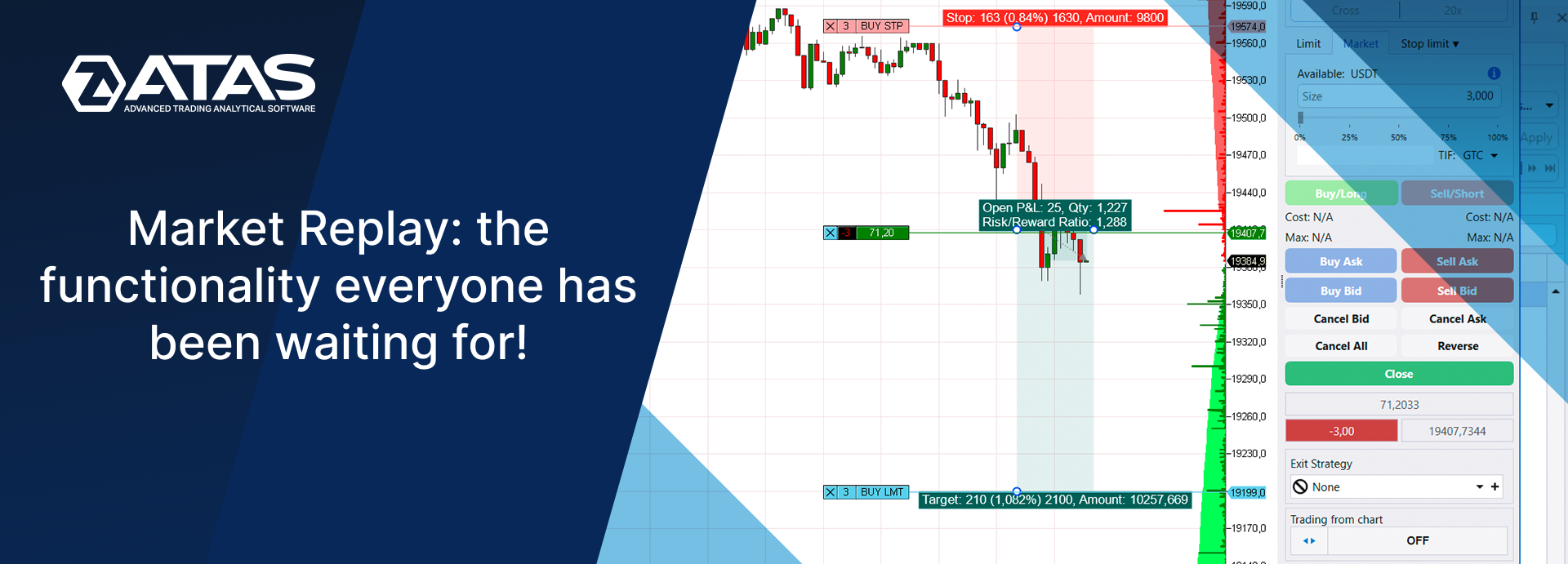
A trader’s simulator, a stock exchange simulator, a manual strategy tester – this function can be called differently, but the idea remains the same. Market Replay allows you to replay history and trade as if charts were being formed in real time.
Read more:
Why you need Market Replay
Market Replay is a “simulator” that uses historical data to recreate in the present the course of trading from the past. Therefore, you can set it in such a way that allows you to reproduce trading that ended, for example, a year ago. Figuratively speaking, this is a “time machine” in the trading platform with Play, Pause, Stop buttons.
The main purpose is to increase the level of traders’ professionalism without the risk of losing money.
Replay allows you to:
- practice your chart-reading skills;
- create new strategies and/or improve existing ones;
- practice the accuracy of entering and exiting a trade until it becomes second nature;
- increase psychological stability, learn to control risks and manage capital more effectively;
- analyze errors and find ways to eliminate them;
- test trading robots.
We must also note that this simulator is a time-saver. A beginner trader does not expect signals to open or close a trade when they adjust the playback speed. It provides rapid progress in learning to trade. A professional, on the other hand, can use Replay to speed up the testing of their trading hypotheses.
Market Replay will be useful for both beginner and advanced traders. After all, markets change, but perfection has no limits.
Five advantages of Market Replay in the ATAS platform
By choosing Market Replay in the ATAS platform, you are using a unique simulator for traders. And this is not an unfounded praise, but a reasoned statement.
Five main reasons why ATAS Market Replay is unique:
- ATAS Market Replay is a server solution. This means that you do not need to download and store databases or other service information on your computer. ATAS Market Replay uses cloud resources and automatically downloads data that is needed for the selected date. No settings required.
- Detailed history including Level II data. That is, you can practice on tick (the most accurate) history of futures, stocks and cryptocurrencies trading, and at the same time take into account the dynamics of limit orders in the DOM.
- You can use cluster charts. You can also use advanced indicators for volume analysis, Smart DOM, Scalping DOM, and Smart Tape modules, non-standard types of charts and other instruments of the ATAS platform.
- You can test different strategies. You can connect trading robots (algorithmic strategies), semi-automatic strategies (to protect capital in a trade, for example) or trade only manually.
- The Market Replay simulator is available even for the free version! Detailed information is below.
Try it for yourself to be sure.
How to run the ATAS Market Replay simulator
Step 1. Download and install the ATAS platform if you have not done it yet.
Step 2. After launching the platform, click the Replay button in the menu of the main program window.
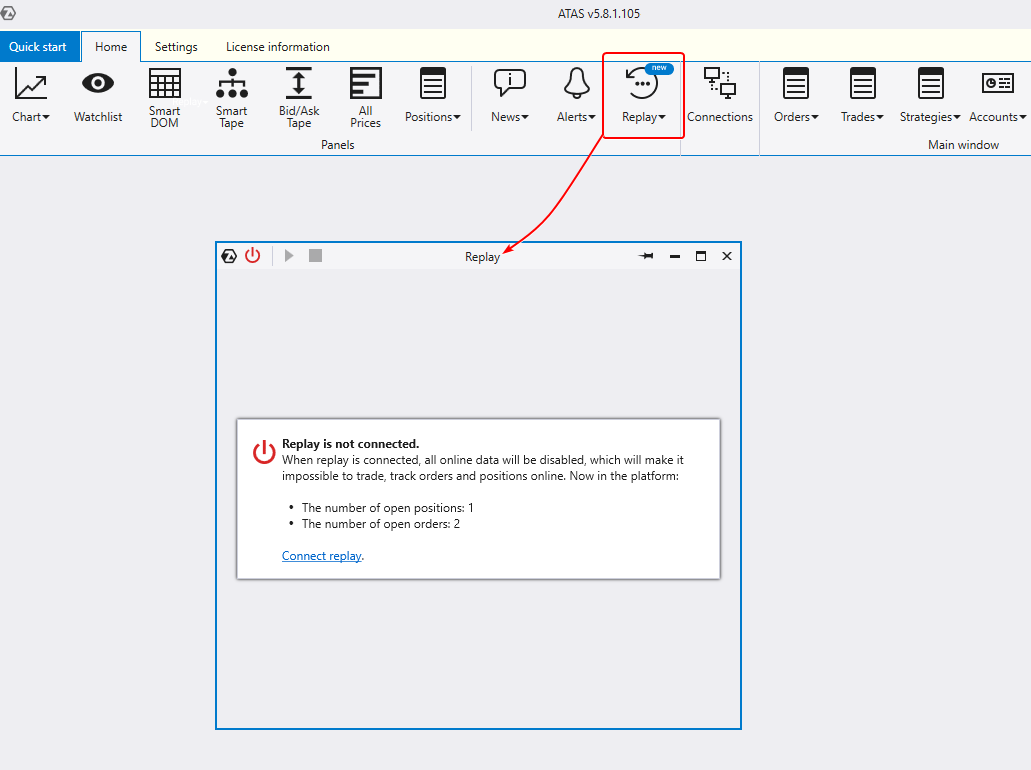
The Replay window will appear. You will see a notification that Replay is not connected. There is a technical nuance associated with time that needs to be clarified.
ATAS uses the Windows system clock by default. When you enable Replay mode, you create an alternate time source that “deactivates” the built-in system clock. This makes it impossible to update charts in real time and get information related to your real positions if there are any. Therefore, we recommend separating work in the real market and training in the Replay mode.
Step 3. Activate and set up Replay.
Activate the “training” mode by clicking on the red power button in the header of the Replay window ( number 1 below). The button will turn green.
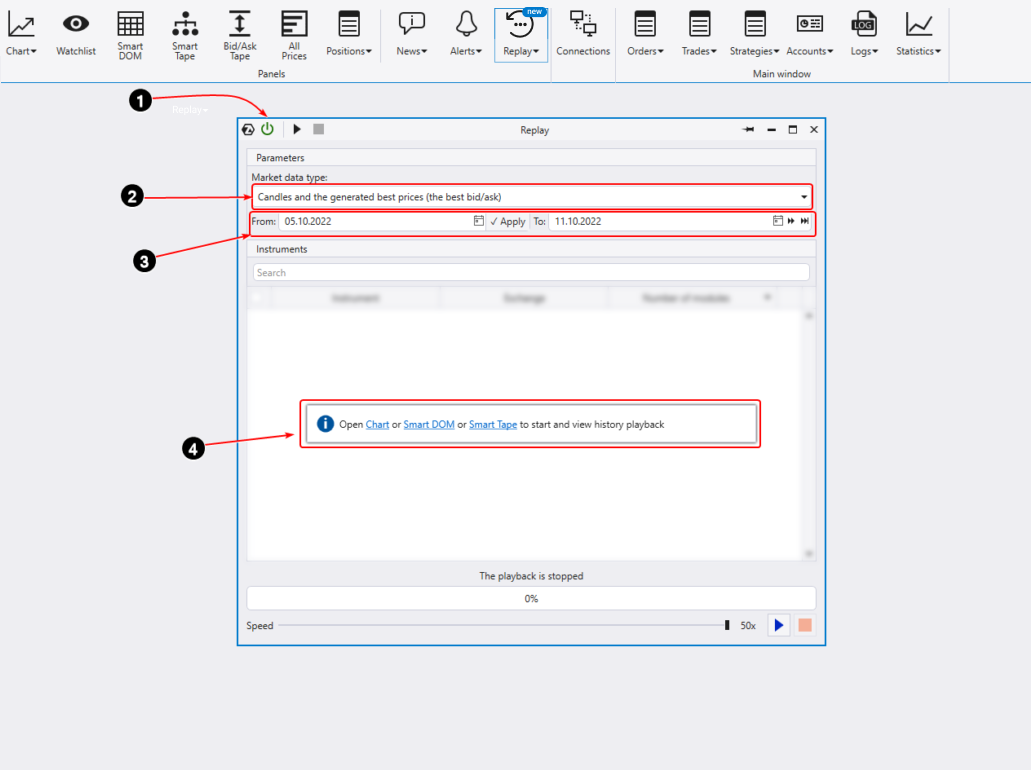
Then specify the history type (number 2 above). According to the principle “the higher the quality, the heavier the data”, three options are available:
- Ticks + DOM. You get complete data for the highest possible accuracy. However, the downside is that you will need to spend time waiting for the necessary amount of data (which is quite large) to be downloaded from the ATAS servers to start Replay on your computer.
- Ticks + generated DOM. This is the best option for training strategies that do not use limit orders from the DOM (market depth, or Level II).
- Generated ticks and the DOM. This is the fastest way to get started. It is good for practicing simple strategies (for example, based on basic technical analysis patterns) without advanced volume analysis.
Set the dates for the replay (number 3 above). All terabytes of the most detailed historical data from various exchanges stored on ATAS servers (!) are available for the replay.
Open the chart of the instrument you are interested in by clicking on the Chart link (number 4 above). Or you can open Smart DOM or Smart Tape to practice.
Step 4. Start the replay.
Tick the modules that will be used in the simulator (number 1 below).
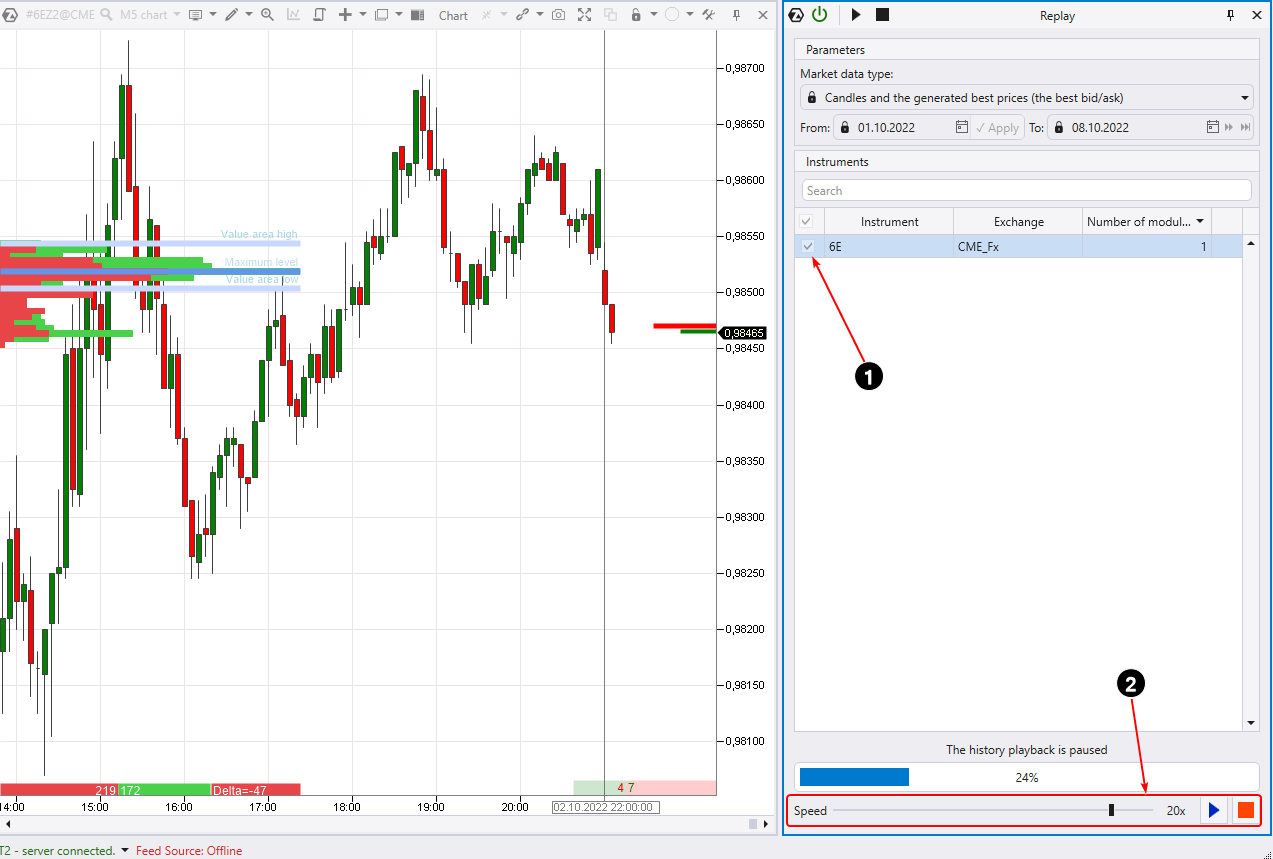
To start the replay, press the Play button on the Replay control panel (number 2 above). The chart will begin to playback the exchange trades for the specified time period. It is also possible to control the speed and pause the playback.
By gaining full control over time, you get the ability to acquire a lot of experience in a much faster way due to more frequent trades. This is very useful because after each practice you will become better than the rest of the market participants (your competitors).
When you click Stop (red square), the “training” will finish.
How to trade in Market Replay
Exchange simulation can be used to build strategies or to test the performance of indicators and patterns. But in the end, it all comes down to making decisions about trades. Therefore, the possibility of making trading operations in the Market Replay mode is provided.
To open the Chart Trader trading panel, press “T”, or the corresponding icon in the menu (number 1 below).
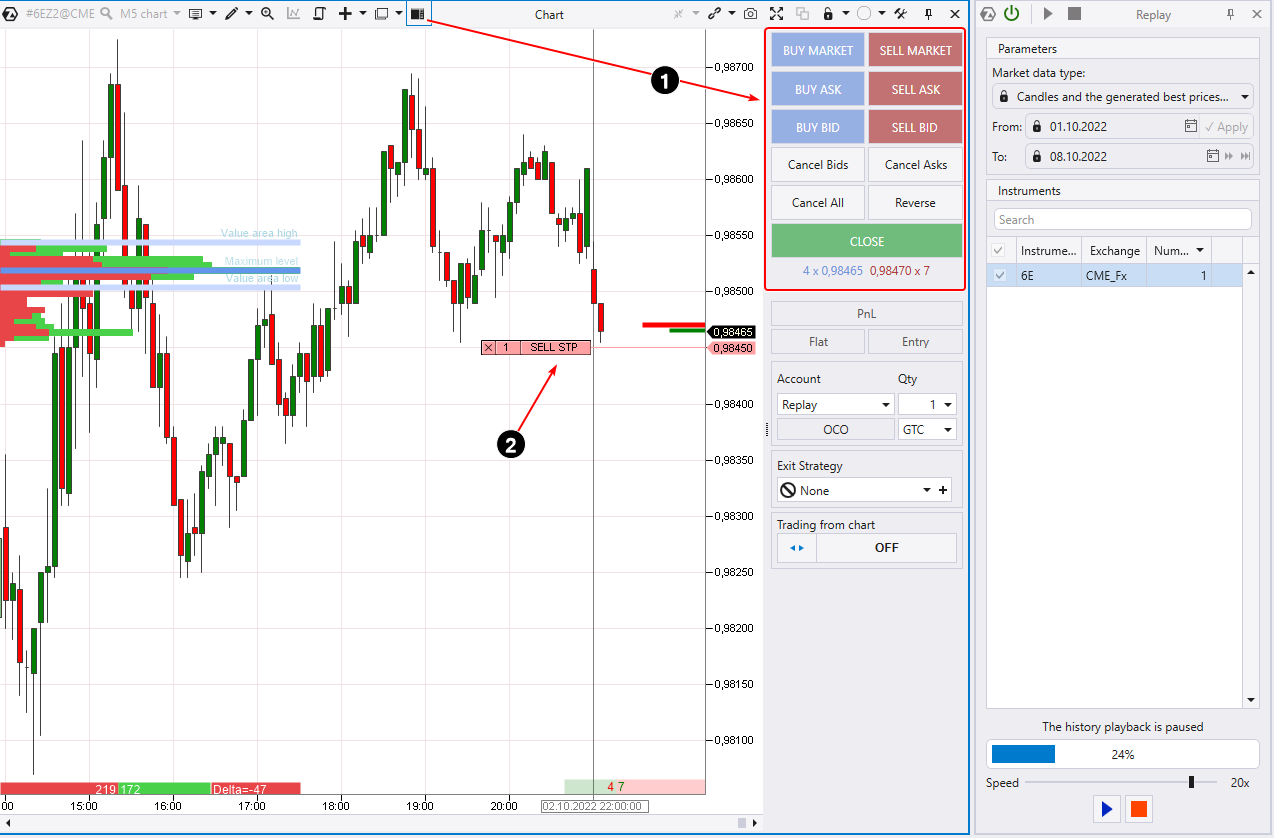
You can place a limit or stop order (number 2 above) in other ways which are clearly demonstrated in the article about ATAS Trading Opportunities.
To start trading, you need to open a separate Replay Account. This is where your trades made in the trader’s simulator will be recorded. Trades will also be displayed on the chart.
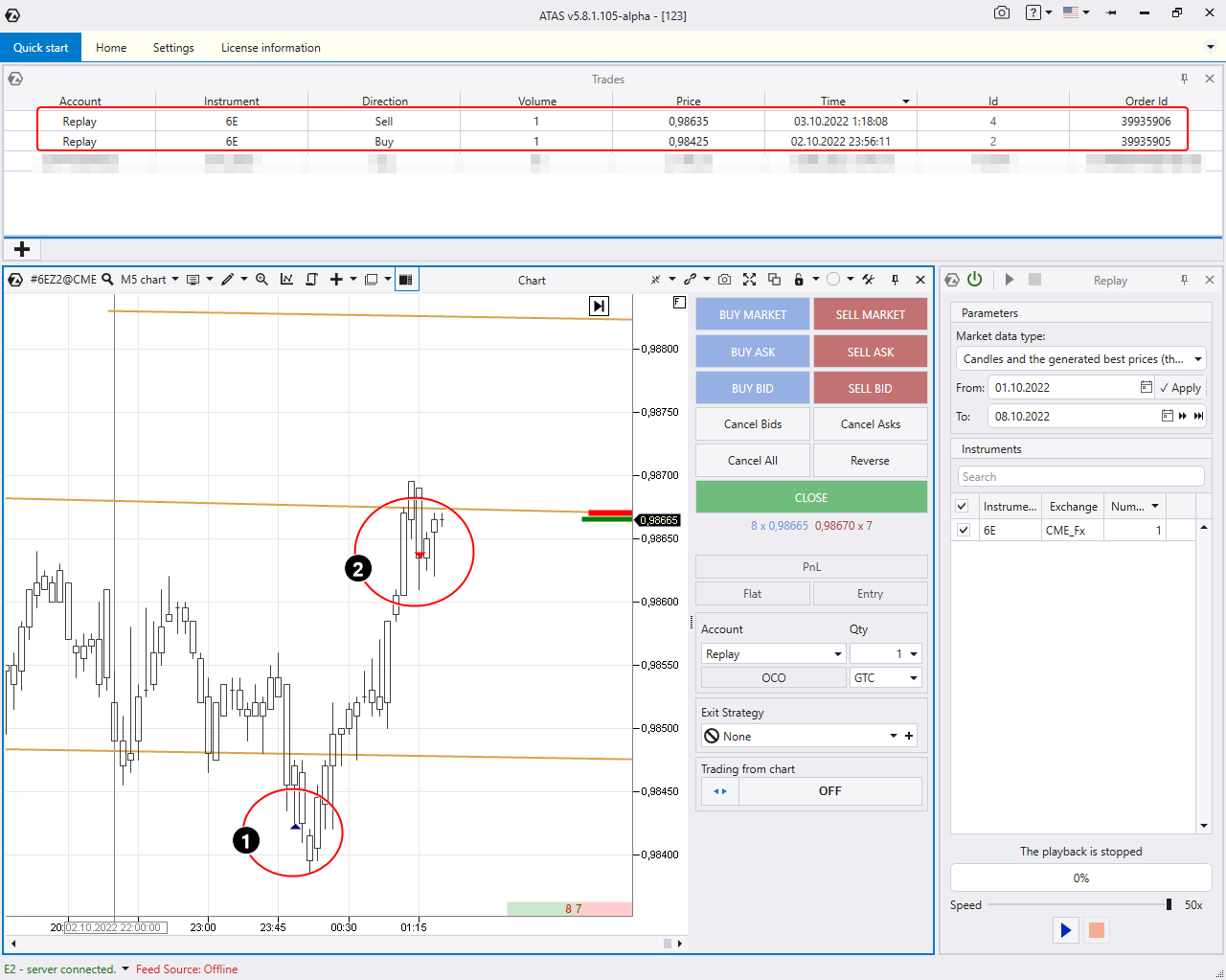
Then you can analyze your performance in the statistics module (profit factor, drawdowns, and other indicators).
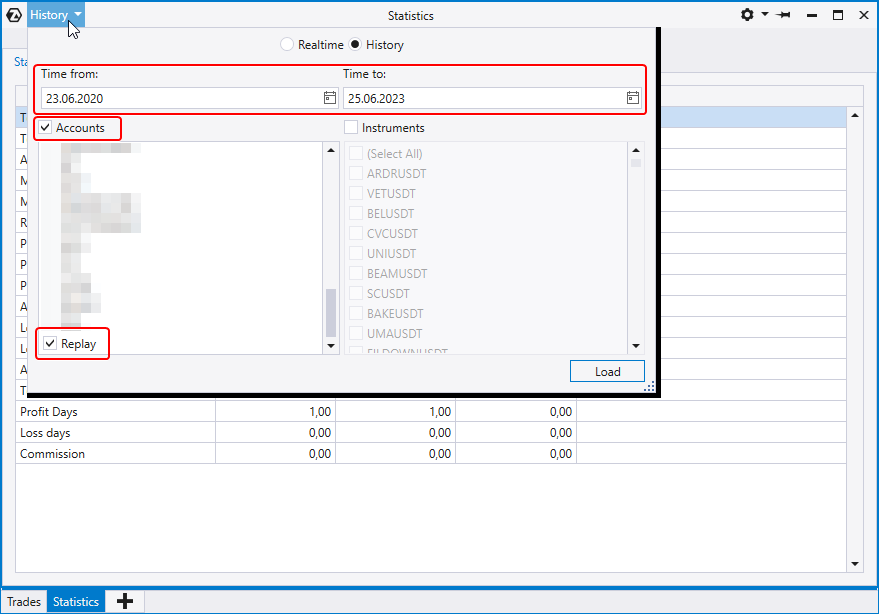
To analyze trading statistics in Market Replay, you need to select an account Account = Replay, and, if necessary, apply additional settings (as shown above).
Please note, since there is only one Account Replay account, each next training session will reset the results of the previous one.
Existing restrictions
Is ATAS Market Replay really free?
Yes, however there are some restrictions that depend on your license.
There are four options:
- Demo license – it is valid for 14 days from the moment you installed the ATAS program.
Market Replay has limited functionality, but it is sufficient:
- only one instrument is available;
- history depth limit = 1 week;
- all three replay modes are active.
- Expired demo license. After 14 days from the installation of the ATAS program.
It is quite acceptable for practicing intraday trading:
- one instrument;
- history depth = 1 day;
- all three replay modes are active.
- Paid tariff.
You will not really notice any restrictions:
- five instruments;
- history depth = 3 months;
- all replay modes are available.
- Lifetime license.
- number of instruments = 20. Other restrictions are removed.
FAQ
Is it possible for traders to train on forex?
Forex is an interbank spot market. The ATAS platform can only connect to exchanges (NYSE, NASDAQ, CME, EUREX, MOEX, cryptocurrency and other exchanges). Therefore, it is impossible to connect to Forex through ATAS. However, if you are a forex trader, you can “train” in the ATAS Market Replay simulator using data from the currency futures market that correlates exactly with the spot forex market. For example, euro futures.
Is it possible to test trading robots?
Yes. ATAS provides the ability to connect trading robots via API. You can get an idea about this feature by reading the article Algorithms for ATAS.
Do you take slippage into account?
No. Slippage and market liquidity are too unpredictable things to model. The ATAS Market Replay exchange simulator assumes ideal conditions for trades, but in reality, slippage can be to your advantage or not.
What does Market Replay offer compared to real-time demo?
The simulator has two main advantages:
- You can adjust the speed to acquire experience in a much faster way and to test strategies.
- It allows you to practice in any part of history, not just in the situation that is happening now.
Why is Replay not working?
First of all, make sure you have the latest version installed. Run the updater (it is usually located at C:Program Files (x86)ATASPlatform.Updater.exe).
After that, if you do everything as it is written in the article, but the ATAS Market Replay exchange simulator does not work for some reason (or does not work as it should), contact the ATAS support service which is ready to help you during business hours.
Conclusions
Thanks to the ATAS Market Replay simulator, you can considerably improve your trading level, regardless of whether you are a beginner or an advanced trader.
Beginners can quickly progress in learning to trade, while professionals can speed up the testing of trading ideas. And you do not risk your money!
The ATAS Market Replay simulator for traders can truly be called unique, as it is:
- Free. Replay works even in the free version, but if you buy a tariff, it will provide even more opportunities!
- Fast. Data is automatically loaded from ATAS servers.
- Functional. All modules, footprints and indicators for volumetric analysis are available during the replay.
- Accurate. Replay uses tick history which stores data on each (!) trade.
- Suitable for everyone. You can practice different styles of stock, cryptocurrency, and futures trading.
Use ATAS Market Replay, the best simulator for a trader. Learn to use professional trader’s instruments at no cost!
Create your own story of success on the exchange.
Information in this article cannot be perceived as a call for investing or buying/selling of any asset on the exchange. All situations, discussed in the article, are provided with the purpose of getting acquainted with the functionality and advantages of the ATAS platform.